In short:
- Ask Documents helps users get to relevant answers faster by scanning project documents and returning project-specific information in response to everyday questions.
- Estimators and preconstruction teams lose time when critical project details are buried across plans, specs, and supporting documents.
- Ask Documents makes the process easier by letting users ask for what they need in natural language, without relying on exact keywords or digging through files page by page.
- That means less time spent manually searching file after file for scope, materials, or important dates, and more time spent using those details earlier in the estimating process to sharpen decisions and reduce missed information.
What Is Ask Documents?
Ask Documents is an AI-powered assistant in ConstructConnect® Project Intelligence that helps users quickly get answers to project questions by searching the project's documents for them.
Instead of digging through files manually, users can type a question and Ask Documents will scan project documents to return the most relevant information, giving them faster, more accurate, project-specific answers.
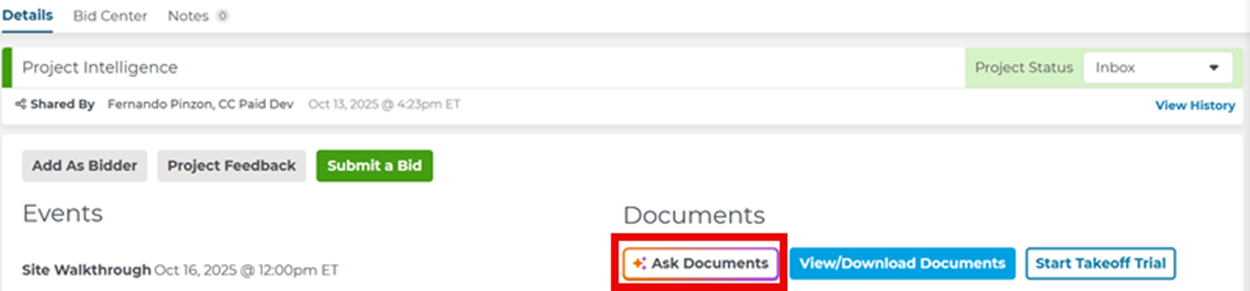
Users can access Ask Documents from the Project Details Page. Open the dialog box, type a question, and review the answer in the chat window. For a full walkthrough, see the Ask Documents help article in the Project Intelligence help center.
The Problem with Manual Document Review
Anyone involved in preconstruction knows the pattern: you need one specific answer, but finding it means opening multiple files, jumping between pages, and piecing together information from scattered documents.
That work is time-consuming on its own. It also creates risk. When important details are buried in specifications, notes, or schedules, it becomes easier to miss something that affects scope, materials, timing, or pricing.
For teams trying to move quickly, that is the real challenge. It's not just about searching faster. It's about getting to the right detail soon enough to use it when it matters.
What Kinds of Questions Can Ask Documents Answer?
Ask Documents is especially useful for questions like:
- What is the scope of work for this project?
- What are the key milestones or project deadlines?
- What materials, finishes, or products are specified for this project?
- What types of concrete are needed for this project?
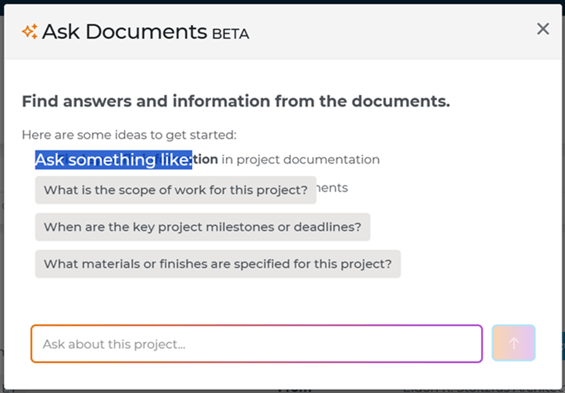
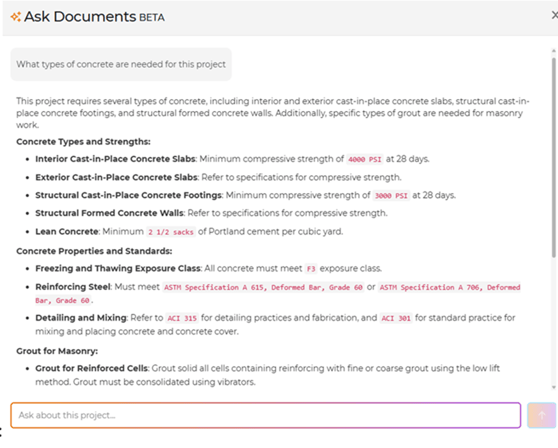
In other words, it helps users get to the details that often sit at the center of early bid review and estimate development.
Where the Time Savings Show Up
The biggest benefit of Ask Documents is speed to relevance.
Instead of manually searching dozens of pages to answer questions like "What is the scope of work for this project?" or "What materials or finishes are specified on this project?", users can ask those questions directly and get a focused answer back from the project documents.
Ask Documents can help uncover high-value information across several areas, including overall and trade-specific scope of work, material and product specifications, plus project milestones and schedule details.
For busy estimators, that shortcut matters. The faster you can get to the relevant answer, the faster you can evaluate the job, clarify assumptions, and keep work moving.
Why Precision Matters Earlier in the Process
Speed alone is not enough. The real value comes from getting specific, project-level details earlier, when it can still influence how you build your estimate.
Ask Documents is designed to return project-specific answers pulled from the documents themselves, helping users zero in on details that might otherwise take much longer to find.
It also supports follow-up questions, so users can start broad and then narrow down to the exact detail they need. For example, someone can ask about the overall scope of work and then follow up with a more targeted question about the electrical portion.
That kind of step-by-step refinement helps teams move from a general understanding of the project to the details that shape real estimating decisions.
According to the 2026 Construction Hiring and Business Outlook from the Associated General Contractors of America (AGC) and Sage, only 23% of construction firms currently deploy AI for estimating work. For most teams, that means this stage of preconstruction is still being handled manually.
For teams using Ask Documents, that means surfacing scope, materials, and schedule details earlier in the process — when there is still time to act on them.
How Ask Documents Helps Teams Work Confidently
That speed also changes how teams approach the work itself.
When users can find relevant answers earlier, they can be used to guide planning, takeoff review, pricing discussions, and internal alignment.
Ask Documents also shows a Sources section when available, identifying where the answer came from in the project documents so users can review the supporting material more thoroughly.
That combination of speed and traceability helps teams move faster without feeling like they're guessing.
A Note on Using It Well
Ask Documents is built to help teams find information faster, but it's still important to use it thoughtfully.
ConstructConnect notes that Ask Documents may occasionally miss information, especially when details are formatted in unusual ways, embedded in tables, or tucked into notes.
It works best with information in specification documents, and while it can pull some data from schedules, highly detailed or complex tables may not be fully captured.
For critical deadlines, users should still confirm the information on the Project Details Page.
That balance is important. Ask Documents is not about replacing judgment. It's about helping teams get to relevant answers more quickly, so they can spend less time searching and more time evaluating.
A Practical AI Tool, Not a Black Box
One of the most useful things about Ask Documents is that it fits naturally into the way people already work.
You do not need to learn a new search syntax or guess the exact keyword that might unlock the right result. You can ask a question the way you would ask a teammate, review the answer, and follow up if you want to drill down to something more specific.
That matters because most teams are not struggling with a lack of information. They're struggling with how long it takes to find the right piece of information and feeling confident that they are looking in the right place.
And because users can share thumbs up or thumbs down feedback on answers, Ask Documents also has a built-in way to improve over time based on real usage.
Ready to See It in Action?
Ask Documents is built for teams that want a faster, easier way to work through project documents and get to the details that matter.
If you want to see how Ask Documents fits into ConstructConnect Project Intelligence—and how it can help your team find answers faster, qualify projects sooner, and move with more confidence— you can book a demo.
Frequently Asked Questions (FAQs)
What is Ask Documents?
Ask Documents is an AI-powered assistant in Project Intelligence that helps users get answers to project questions by searching the project documents for them.
What kinds of questions can Ask Documents answer?
Ask Documents can help with questions about scope of work, materials and product specifications, project milestones, schedule information, and other project-specific details found in the documents.
Can I ask follow-up questions to get more specific details?
Yes. Users can start with a broad question and then ask follow-up questions to focus on the exact detail they need.
How do I get access to Ask Documents?
Ask Documents is available in Project Intelligence. Existing users can access it from the Project Details Page on eligible projects, and teams that want to see how it fits into the broader ConstructConnect workflow can book a demo.
Why can't I access Ask Documents on some projects?
Ask Documents is available on projects bidding within the next 30 days when documents have been successfully processed and indexed. If the feature does not appear, the documents may still be indexing or the project may not have usable documents attached.
Will Ask Documents show where the answer came from?
Ask Documents identifies which documents the information comes from, and the Sources section can help users review the supporting material more efficiently. Direct links to specific source pages are planned for future updates.
Why should I double-check bid dates or deadlines?
For critical deadlines, users should still confirm the information on the Project Details Page. Ask Documents is designed to help teams find information faster, but important dates should always be verified before action is taken.
