In short:
-
AI preconstruction tools, including Ask Documents in ConstructConnect® Project Intelligence and Takeoff Boost™ in On-Screen Takeoff® and PlanSwift®, help contractors and estimators qualify projects and complete takeoffs in a fraction of the time it used to take.
-
Matt Ferris, Preconstruction Manager at McClure Engineering, replaced Bluebeam keyword search with Ask Documents, saving 15–30 minutes per project.
-
Vincent Kelly, President of Hudson Valley Drywall, gets 4–5 hours back on large plan sets using Auto Link, time his team redirects to chasing more bids.
-
In a live poll during our latest webinar, 60% of attendees described their AI outlook as "cautiously optimistic, keeping a human finger on the mouse."
What Are AI Preconstruction Tools?
AI preconstruction tools are software features that automate time consuming, repeatable tasks in the project qualification and estimating process. In the ConstructConnect® ecosystem, they fall into two categories: data intelligence tools that help teams find opportunities faster, and takeoff automation tools that reduce the manual work of measuring and counting from plan sets. Both are designed to save hours per project, not by replacing estimator judgment, but by eliminating the setup work that eats into the workday before any real thinking begins.
How Ask Documents Cuts Project Qualification Time
Every bid decision starts with the same question: is this job worth my time?
For most teams, answering that means combing through project documents the old way: specification sections, addenda, hundreds of pages, searching for the details that tell you whether a project fits your trade and business.
ConstructConnect® Project Intelligence recently introduced a feature called Ask Documents that changes this process entirely. You type a plain-language question: "Does this project require a licensed surveyor?" or "What type of vinyl siding is specified?" and get a cited answer drawn directly from the project documents.
Matt Ferris, Preconstruction Manager at McClure Engineering, uses it on every project his team evaluates. "We used to use Bluebeam to do keyword searches through specifications. That's gone completely by the wayside. With Ask Documents, we can ask project-specific questions and get answers in seconds."
His colleague Bart Zimmer, who handles alternates and quantity breakdowns, summarized it plainly: "Use it to your advantage. It's only going to help you be more productive and get more work in the door."
Because Ask Documents is grounded directly in project documents instead of general web knowledge, the AI tool built in Project Intelligence provides citations for every answer. That means you can verify before moving on. McClure's team sends out 8 to 10 proposals a day. At 15 to 30 minutes saved per project, the hours add up fast.
Auto Takeoff Cuts the Grind Out of Measuring
Before any other tool kicks in, there's the takeoff itself: tracing areas, measuring area, linears, counting symbols. This manual work takes hours before you can put a number on anything.
Auto Takeoff, the core feature in the Takeoff Boost™ suite inside On-Screen Takeoff and PlanSwift handles the repetitive work automatically. It scans your Plan Set, then detects and measures areas, linears, and counts, giving your team a jump start instead of a blank page. Estimators using Auto Takeoff complete takeoffs up to 95% faster than manual methods.
Kat Kim, Senior Product Manager at ConstructConnect, puts it plainly: "Auto Takeoff is there to give you a jump start on the takeoff to save you time. You're always going to want to make your edits and put your bid together as you'd like. It's not there to replace humans. It's there to help save you time and speed things up."
Auto Link Eliminates Manual Hot-Linking on Large Plan Sets
On the takeoff side, one of the biggest time drains on large commercial projects has nothing to do with measuring. It's navigation: finding where the reference details live for each symbol across a plan set.
Auto Link, part of the Takeoff Boost™ suite in On-Screen Takeoff®, solves this with one click. It scans your entire project and automatically creates Named Views and Hot Links between detailed symbols and their corresponding reference details across every page, regardless of project size. This means estimators can jump through Plan Sets with a click instead of manually linking everything by hand.
Vincent Kelly, President of Hudson Valley Drywall, describes what Auto Link replaced for him: "You used to have to make those Hot Links yourself. You'd sit there, find the details, and make the connection page by page. Now it does it for you."
On larger jobs, Auto Link returns 4 to 5 hours per project. But speed isn't the only benefit. It reduces the mistakes that come from missing a reference buried deep in a large plan set.
"You make a lot less mistakes," Vincent says. "I have the time now to look at the plans to make sure I didn't miss anything. It cuts a lot of having to go back and say 'Oh, I missed this' or arguments later over what was or wasn't on the plan."
Auto Count and Auto Name Round Out the AI Toolkit
Two additional AI tools in Takeoff Boost make a real difference on tight bid windows.
Auto Name renames every page in a Plan Set automatically. For Vincent, a 200-page plan set that used to take a full day to organize now takes 10 minutes: "You click it, and ten minutes later, it's done."
A new version of Auto Count identifies and tallies symbols such as footings, doors, corner guards, windows across up to 20 pages at once. It is more than 65% more accurate than the previous generation of Auto Count, and it runs in the background while you work on other parts of the takeoff.
The Before and After at a Glance
| AI Tool |
Available In |
What You Used to Do |
What It Does Now |
Time Returned |
| Ask Documents |
ConstructConnect Project Intelligence |
Keyword search across thousands of specification pages |
Plain-language Q&A with citations in 15–30 seconds |
15–30 min per project search |
| Auto Takeoff |
On-Screen Takeoff, PlanSwift |
Manually trace areas, measure linears, and count items on plan sets |
AI detects and measures areas, linears, and counts automatically with built-in presets |
Up to 95% faster than manual takeoff |
| Auto Name |
On-Screen Takeoff, PlanSwift |
Manually rename every page in a Plan Set |
Renames all pages automatically |
Go from a full day’s worth of work to 10 minutes |
| Auto Link |
On-Screen Takeoff, PlanSwift |
Create Hot Links between symbols and reference details by hand |
Auto generates links across the full project |
4–5 hours on larger projects |
| Auto Count |
On-Screen Takeoff, PlanSwift |
Count symbols manually, page by page |
Counts across up to 20 pages simultaneously |
Hours of manual counting |
Is AI in Construction Accurate Enough to Trust?
You're not alone if you're not fully sold yet. In a live poll during our recent webinar Building Season is Here: AI Made Easy for Preconstruction Pros, 60% of attendees said they're "cautiously optimistic, keeping a human finger on the mouse." Another 14% said they're watching from a safe distance, and 6% said they still trust their spreadsheet more. Only 1 in 5 were ready to automate everything.
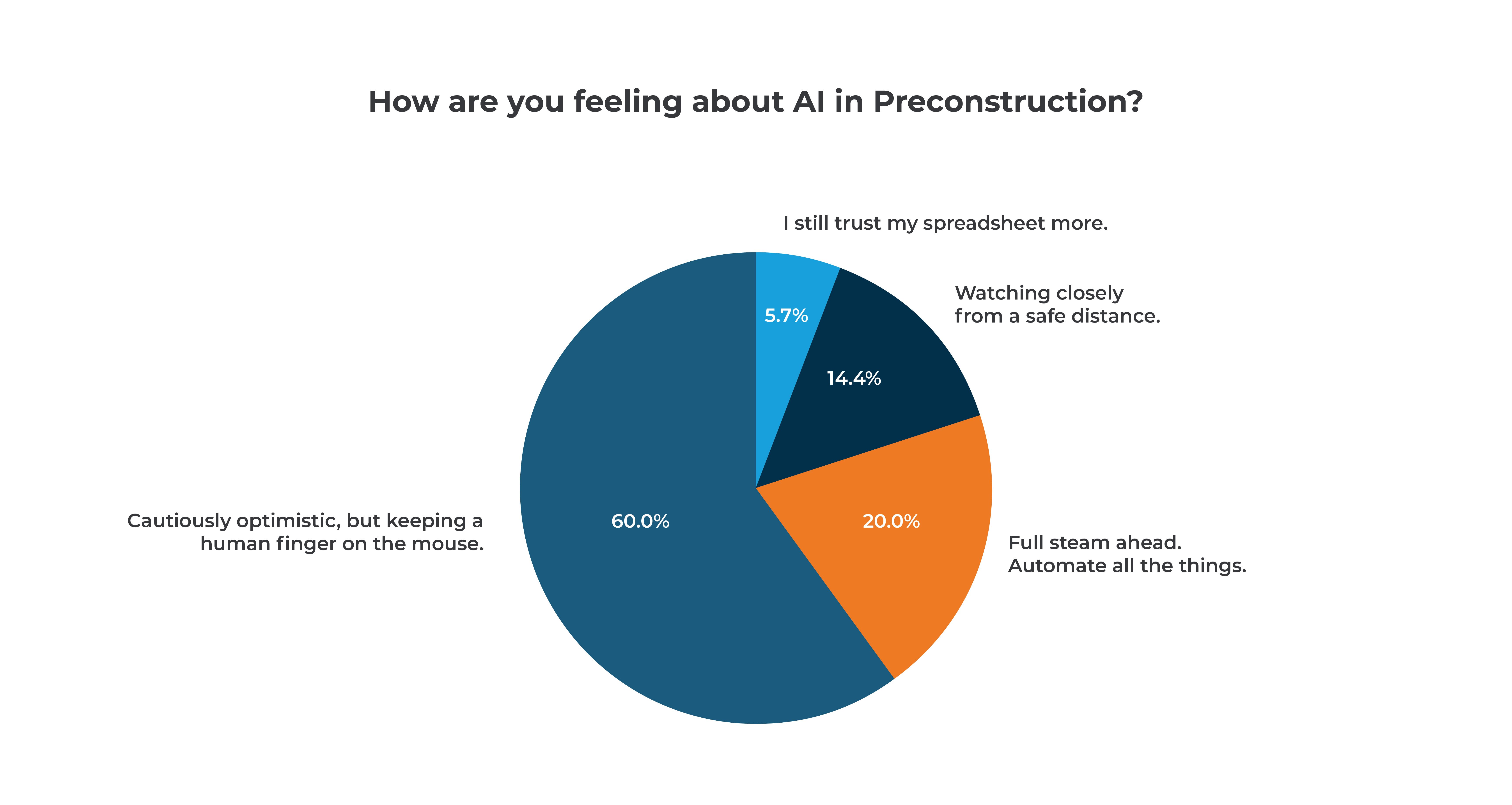
That split lines up with what the RICS 2025 AI in Construction report found across the broader industry: nearly 70% of project managers believe AI will help them deliver greater value, but most haven't fully committed. The hesitation is rational. And "trust it, then verify" is exactly the right place to start.
Cross reference the output against the source documents. Spot-check counts on a few pages. Build that habit, and you'll develop the instinct for where AI is reliable and where to look closer.
What AI does well in preconstruction is extract and organize. What estimators do well is interpret, prioritize, and decide. These aren't competing skills.
Matt's advice for anyone still skeptical: "I’ll be honest; I was opposed to AI. But it was a Friday night, I was at work, and I was absolutely amazed at the results I got and how quickly I got them. A light bulb went off. The sooner you start using it, the sooner you're going to benefit from it."
See AI Work on a Project from Your Own Pipeline
ConstructConnect Project Intelligence and On-Screen Takeoff are available today with the AI tools covered in this post. For another look at what Takeoff Boost delivers on a real commercial project, our post on how Sheri Winslow at AKS Interior Systems cut her takeoff time from days to minutes is worth a read.
To see Ask Documents and Takeoff Boost on a project from your own pipeline, schedule a demo with our team, and watch how it works specifically with your workflow.
Frequently Asked Questions (FAQs)
What are AI preconstruction tools and how do they work?
AI preconstruction tools automate repeatable tasks in the project qualification and takeoff process. Ask Documents uses natural language processing to answer questions about project specifications, grounded directly in the project documents. Auto Takeoff automatically detects and measure areas, linears, and counts on plan sets, completing in minutes what used to take hours of manual tracing. Other Takeoff Boost tools like Auto Link and Auto Count automate navigation and symbol counting across pages.
How much time can AI tools actually save on a construction estimate?
Time savings vary by project size and which tools you use. Auto Takeoff completes areas, linears, and counts up to 95% faster than manual methods. During the Building Season is Here webinar, contractors using Ask Documents report saving 15 to 30 minutes per project on document review. Auto Link returns 4 to 5 hours on larger plan sets. Auto Name can turn a full day of page-renaming into 10 minutes. Combined, these tools significantly reduce both pre-estimate setup time and the takeoff itself on tight bid schedules.
How accurate are AI takeoff and data tools?
AI tools in takeoff and document review are built as a starting point, not a final answer. The recommended workflow is to trust but verify the results you get. Use AI to do the extraction, then confirm the output before committing to a number.
What is Ask Documents in ConstructConnect Project Intelligence?
Ask Documents is an AI feature in ConstructConnect Project Intelligence that lets you ask plain-language questions about project specification documents and receive cited answers in seconds. Instead of running keyword searches across thousands of pages, you type a specific question about materials, surveying requirements, scope details, or anything else in the specs, and the tool surfaces the relevant answer with a reference to its source in the documents.
Which projects can I use Ask Documents on?
You can use Ask Documents on projects that are actively bidding and have project documents available to search. Because Ask Documents pulls answers directly from a project’s documents, it works best when those documents have been uploaded, processed, and indexed. If you do not see the feature on a project, it may not be in the bidding window yet, may not have any uploaded documents, or the documents may still be processing.