In short:
- ConstructConnect® Project Intelligence helps painting contractors find the right jobs with advanced search filters and daily alerts on new and updated relevant projects.
- With advanced search filters, painters can quickly narrow down a large project database to pinpoint the jobs that fit their trade, timeline, and location.
- Saved searches and daily email alerts automatically deliver new and updated projects that match a painting contractor's criteria, so your pipeline stays active.
For painting contractors, finding the right project can feel like a full-time job. There are a lot of commercial buildings that need finishing and new builds that need a fresh coat of paint, but finding projects that match your business’s skills, schedule, crew size, and location can narrow the opportunities.
ConstructConnect® Project Intelligence turns this into reality. It’s built to search for commercial construction projects by filtering out what’s irrelevant to your company, so you can give more attention to the right jobs you want the best shot at winning.
We recently hosted the webinar, Win Bids Before the Paint Dries: How Painters Find Projects and Finish Takeoffs Faster. During this session, Christina Rodriguez, Product Manager at ConstructConnect, walked users through exactly how to use this tool to find painting projects.
Start with a Focused Search
When you first log into Project Intelligence, the volume of data can be overwhelming. With more than 825,000+ active projects in our database, there will be thousands of projects that have nothing to do with painting or are located far away.
You don’t need to see everything, just the right projects. Christina Rodriguez showcased a solution immediately: “We have a lot of useful tools in Project Intelligence to narrow down to exactly what you’re looking for. You’ll notice a lot of different filters on the left panel. These are going to be your best friend.”
Advanced Search Filters: Timeline, Location, and Trade
Project Intelligence allows you to set a bidding timeframe, such as projects bidding in the next 30 days. This allows painting contractors to focus on immediate opportunities.
From there, you can filter by location using your pre-set service area, specific cities, counties, or state to ensure you’re only seeing the jobs within your operational reach.
One of the most crucial filters for painters is the “Trades” filter. Simply type “paint” or your specific CSI code number in the filter search bar. This instantly narrows your results, so you’re only seeing projects where your specific skills are required.

Automate Your Search
Creating the perfect search is great, but having to do it every single time is inefficient. Project Intelligence allows you to save your filtered searches so you can access them with a single click. If you build a search for painting projects bidding in the next 30 days within your service area, you can click on ‘Save Search,’ and it can be set as your default view every time you log in.
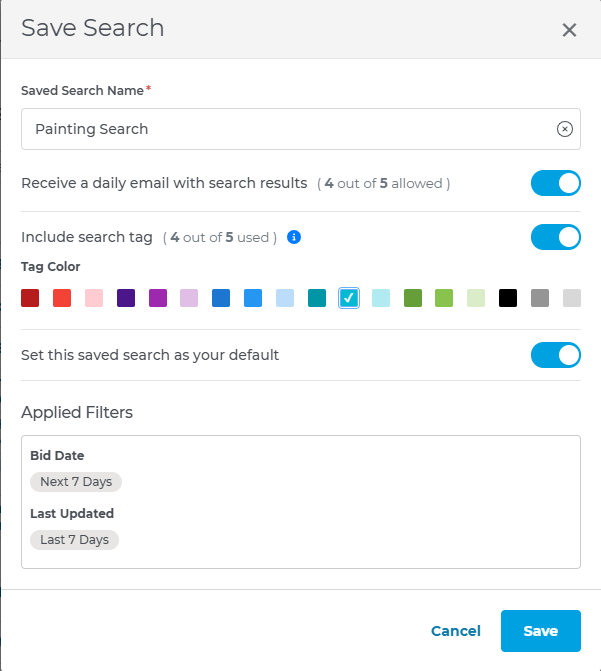
“The cool thing with saving a search is you can actually turn on email notifications,” Christian states. “What happens every night is the system will scan through all new and updated projects, and if it hits on your search, you will have an email in the morning with that new list of projects.”
Track, Manage, and Bid with Confidence
Finding the right project is just the beginning. Project Intelligence provides additional tools you need to manage the opportunity from the moment you find the job to the moment you submit a bid.
Watch Projects
Once you find a project you’re interested in, you can click the start icon to “watch it.” You’ll receive notifications about any updates, such as a new addendum, so you’re always working with the most current information. You can also view all your watched projects in a dedicated list for easy access.
Access Key Contacts
Each project listing includes detailed contact information for the design team, a bidders list, and a list of plan holders. This information is crucial for building relationships and getting your bid to the right people.
Submit Bids Directly
Once your takeoff is complete and your bid is ready, you can submit it directly through the Project Intelligence platform. The ‘Submit Bid’ feature pulls in the relevant bidders from the project, letting you enter your bid amount, attach your documents, and send it off. The GCs receive a professional email with all your information, and it will link them so they know exactly what project you’re bidding on.
Start Finding the Right Paint Projects Today
Commercial painting is a competitive industry. Painting contractors who can move faster have an advantage over their competitors. Project Intelligence offers a strong set of tools designed to help you from project discovery to bid submission.
By using advanced filters and saving and automating your searches, you can start filling your pipeline with the right projects for your painting business.
Explore what Project Intelligence can do for your business. Take your first step to winning more bids by scheduling a demo. We’ll show you how our tools are uniquely designed with your trade in mind.
More from the Webinar: Speed Up Your Paint Estimates
Finding the right jobs to bid is half the battle. Measuring plans and creating accurate estimates is the other half. This blog is part of our webinar recap series.
During the webinar, Blake Beal, Senior Product Manager at ConstructConnect, interviewed a painting contractor who uses Takeoff Boost to speed up his takeoffs. Read this Q&A with William ‘Bill’ Brady, Chief Operating Officer at KBI Painting Inc., to see how AI-powered takeoffs are helping his painting company get more bids out the door.