In short
- What is ConstructConnect Takeoff? ConstructConnect® Takeoff is AI-powered, web-based construction takeoff and estimating software that helps estimators measure plans, calculate quantities, develop estimates, and prepare bids directly in their web browsers.
- Pricing and plans: Two options are available for ConstructConnect Takeoff: Starter and Professional. A Starter subscription costs $100 per seat per month ($1,200 annually), and Professional starts at approximately $205 per month for the first seat ($2,450 annually), additional Professional seats are less. Both Starter and Professional require annual contracts with annual payment terms.
- AI-powered automation: Every document you upload is analyzed by Takeoff BOOST™; its Auto Name and Auto Scale tools prepare and organize your documents, so your plans and specs are ready for you as soon as they are uploaded, reducing manual project setup.
- Intelligent project analysis, takeoff, and estimating: A Professional subscription adds Takeoff BOOST™ Auto Takeoff and Takeoff Assist, which uses AI to analyze a project for scope, detect and measure linear, area, and count quantities, and apply material and labor assemblies to build your estimate.
- Web-based collaboration and connected preconstruction: ConstructConnect Takeoff runs in a web browser on Macs and Windows, and Professional subscriptions support team collaboration and multi-user sharing. As part of ConstructConnect's broader preconstruction ecosystem, it complements ConstructConnect® Project Intelligence, helping contractors discover thousands of real bidding opportunities and move from finding projects to preparing competitive bids.
- Why choose ConstructConnect Takeoff? Built on ConstructConnect's experience with On-Screen Takeoff®, PlanSwift®, and QuoteSoft®, it combines established digital takeoff and estimating expertise with cloud accessibility, AI-powered automation, and supports a comprehensive preconstruction workflow. We'll also compare ConstructConnect Takeoff with leading competitors so you can decide which solution best meets your needs.
What is ConstructConnect Takeoff?
ConstructConnect Takeoff is web-based construction takeoff and estimating software that helps estimators turn project drawings into measurable quantities and then a priced bid, ready for submission. Teams can organize plans, set up takeoff conditions, measure and review quantities, then apply material and labor pricing or export results for the next stage of estimating. Because the application runs in a browser, estimators can work on a Mac or Windows machine without installing a traditional desktop takeoff application. Its appeal is not simply that it can automate measurements.
ConstructConnect Takeoff pairs familiar estimator tools with Takeoff BOOST™ and Takeoff Assist, helping teams move from finding project details to measuring scope and developing estimates, while keeping an estimator involved in review and decision-making.
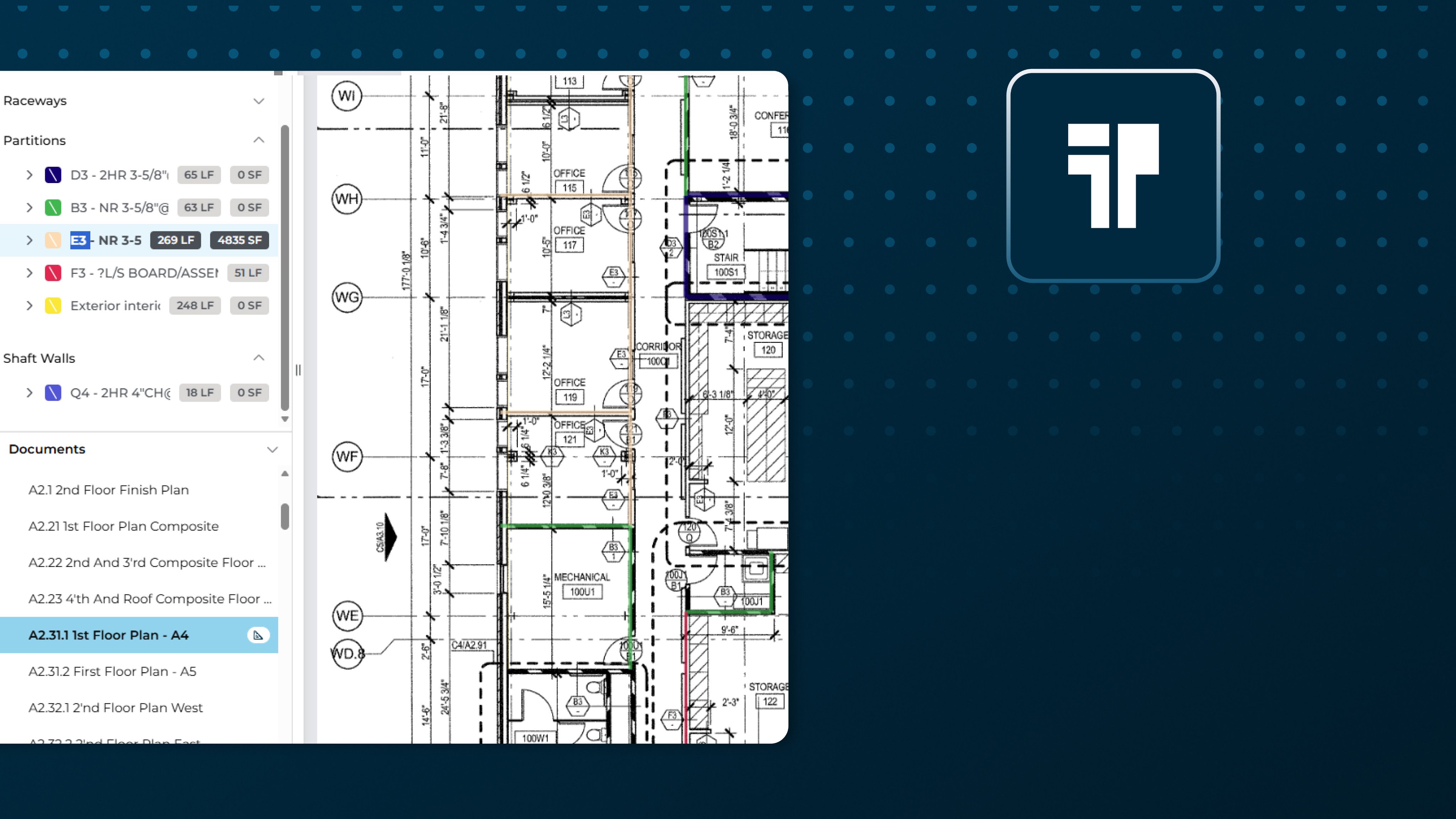
ConstructConnect Takeoff includes all the expected takeoff tools but starts with Takeoff BOOST’s AI-powered toolset to automate the setup, analysis, takeoff, and estimating chores that steal your time. From the very start, Auto Name and Auto Scale name, scale, and organize your plans – something that could take hours if done manually. For ConstructConnect Takeoff Starter users, all the familiar takeoff tools are available: linears, areas, counts. Create as many conditions as you like, then export to Excel or print off your plans and takeoff to PDF.
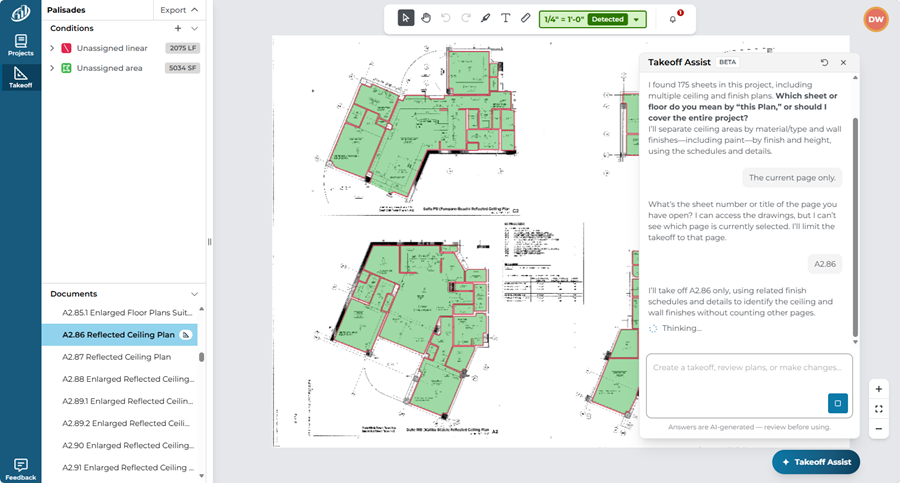
ConstructConnect Takeoff Professional users get access to Takeoff Assist and Auto Takeoff that can save hours or even days of your valuable time. Auto Takeoff’s new trade support includes trades such as exterior elevations, concrete, flooring, landscaping, drywall, painting, plumbing, roofing, mechanical, and electrical, which help build prompts that instruct Takeoff Assist what to do for you.
The broader workflow also includes material and labor pricing. Using ConstructConnect’s Starter Catalog, or your custom-built Catalog, you just drag and drop Assemblies or Items into a Condition to start building your estimate. Once complete, you can export conditions and quantities to Excel for more complicated estimates or generate CSV exports to share with customers or material suppliers.
From project creation and plan upload to analysis, takeoff, estimating, and bid submission, ConstructConnect Takeoff is your one-stop takeoff and estimating solution.
The payoff is practical: less repetitive plan preparation, faster initial quantity generation, and more time to assess scope. These workflow benefits free up time so you can fine-tune your estimate, ensure up-to-date material costs and labor rates, finding projects that are the best fit for your business, and strengthening relationships with contractors, owners, and vendors.
Takeoff Assist: Project Analysis, Takeoff, and Estimating In A Single, Seamless Workflow
Estimating starts well before someone draws a measurement. First, teams need to understand the plans and specifications. Then they need reliable takeoff measurements. Finally, they need to turn those measurements into a usable starting point for estimating. Takeoff Assist is your AI assistant that helps you at all three stages through natural-language interactions.
1. Project Analysis: Find your answers quickly
Instead of hunting manually through a large plan set, just ask Takeoff Assist, “Tell me about this project” or ask other questions about the project. Takeoff Assist analyzes your entire plan set and specifications in minutes. It delivers a comprehensive project overview so you can quickly understand scope, find the information that matters most, and create more accurate takeoffs and estimates. Inconsistencies or omissions are called out to be checked against the underlying drawings and specifications, especially when requirements are ambiguous.
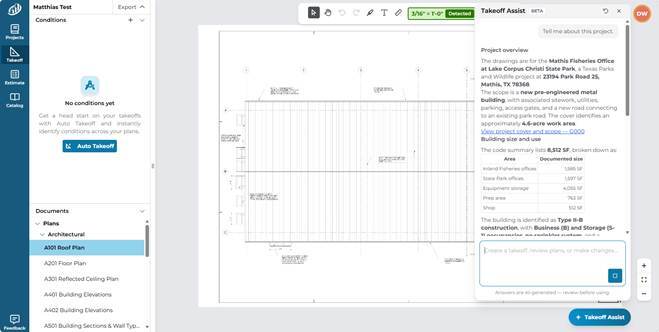
In our example, Takeoff Assist responded to our request for information on this project by telling us the scope, basic building details, and other useful information. We can make an informed decision on how to proceed – rather than wasting time poring over plans manually to make a bid/no bid call.
2. Takeoff: Turn scope into reviewable quantities
Takeoff Assist can help create takeoff across relevant project pages in response to a natural-language request. Its results provide a reviewable starting point, not an unexamined final quantity. Not sure what to ask? Use the Auto Takeoff feature and select one of the trades to get started. Takeoff Assist will ask you for more information if your prompt isn’t clear, and you can always fine-tune your results. Estimators can inspect what was identified, check scale and scope, and refine the work as needed.
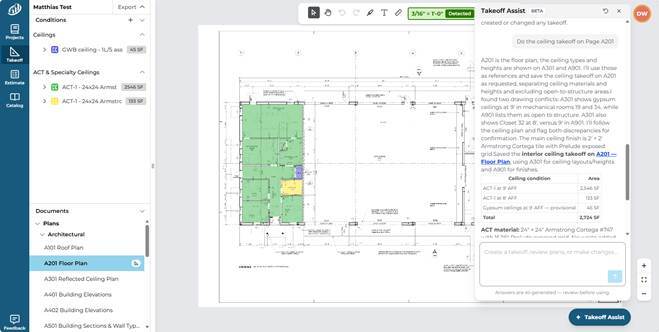
In our example, we asked Takeoff Assist to measure ceilings on the wrong drawing. It identified the discrepancy and alerted us but completed the requested takeoff. We could then ask Takeoff Assist to remove those results and repeat the measurement on the correct drawing or simply copy the takeoff to another page.
You are always in control and are responsible for reviewing all results.
3. Estimating: Connect takeoff quantities to material and labor costs to generate an accurate estimate
Takeoff Assist also supports estimating, helping users move from measured scope toward costs, all within a complete ConstructConnect Takeoff workflow. For supported trades, catalog-based item and assembly recommendations can help build an initial estimate from quantities. Estimators remain responsible for confirming selections, material costs, labor rates, and the final bid values.
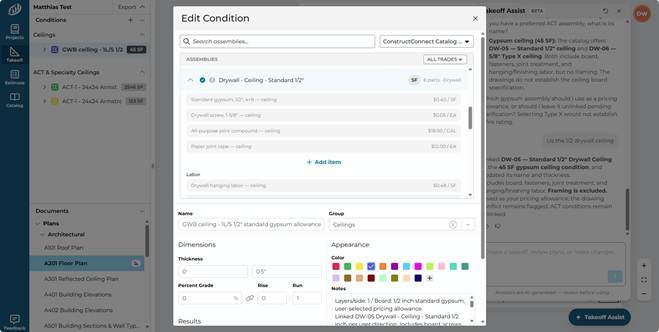
When Takeoff Assist isn’t sure what to do, it asks for clarification. In this case, we asked it to apply appropriate Assemblies to the Ceiling conditions, and it needed to know if we wanted to use the 1/2” or 5/8” variant.
Together, these capabilities create a straightforward progression: understand the project, measure the work, then develop the estimate. Rather than positioning AI as a replacement for experience, Takeoff Assist puts it to work on repetitive steps so estimators can concentrate on interpretation, validation, and pricing decisions.
Takeoff Assist - including its project analysis, takeoff, and estimating capabilities, and expanded-trade Auto Takeoff support, are currently beta features available to all ConstructConnect Takeoff Professional users. Functionality and supported workflows may evolve during beta.
Web-Based Collaboration and Estimating Handoff
Teams evaluating a new takeoff tool should look beyond whether it has “AI” in the feature list. Consider who needs to collaborate, how measurements are reviewed, what trades are supported, and how the resulting quantities are used in estimating. Having “AI” doesn’t mean anything if it doesn’t do something to move your team forward.
Because ConstructConnect Takeoff runs in a browser, teams can access their projects across Mac and Windows devices without a traditional desktop installation. The application supports drawing organization, manual takeoff, and condition editing. It also supports exporting takeoff quantities to a CSV or PDF, and Professional subscribers can export takeoff and plans to PlanSwift, On-Screen Takeoff, and QuoteSoft. One set of plans, one project, one takeoff, one estimate – all available to and shared with everyone on your team (collaboration available to Professional subscribers).
ConstructConnect Takeoff Pricing
ConstructConnect Takeoff offers two subscription plans: Professional and Starter. Both plans include an unlimited number of projects in your organization, and both include Auto Name and Auto Scale, powered by Takeoff BOOST™. These tools prepare and organize your plans upon upload, so you are ready to start working as soon as you open a page. Both tiers also support manual linear, area, and count takeoff; annotations, such as text, highlights, and dimension lines; and exporting to PDF (plan and takeoff) or CSV (conditions and results, for editing in Excel or another spreadsheet).
Professional costs $2,450 annually for the first seat and $1,950/seat/year for each additional seat. Professional users get access to Takeoff Assist (beta) and Auto Takeoff with expanded Trade Support (beta), enjoy unlimited plans and specs per project, and can collaborate with other takeoff users. Professional users can export their plans and takeoff to On-Screen Takeoff, PlanSwift, and QuoteSoft and have access to professional training.
Starter costs $1,200 annually. With Starter, you can purchase a single seat and view/takeoff the first 25 pages in your project. However, you do not have access to Takeoff Assist or Auto Takeoff, nor can you load specs into a project.
For an apples-to-apples comparison, account for the number of users, contract terms, plan limits, collaboration needs, automation access and estimating capabilities, not just the lowest advertised price. Beta access to Takeoff Assist and expanded-trade Auto Takeoff should not be confused with permanent plan entitlements, and these beta features are subject to ongoing development, refinement, or removal. Beta features are only available to Professional subscribers.
How does ConstructConnect Takeoff Compare with Other Automated Takeoff Solutions?
Competing platforms emphasize different combinations of takeoff, AI assistance, collaboration, and estimating. The table below summarizes their published positioning rather than declaring a universal winner. All prices are indicative and should be reconfirmed directly with each vendor.
|
Platform
|
Core Workflow Capabilities
|
Public pricing cited*
|
|
ConstructConnect Takeoff
|
Setup: AI-powered plan naming, organization, and scaling.
Analysis: Takeoff Assist analyzes project plans and specifications and answers scope questions.
Takeoff: Manual measurement and AI-powered takeoff across supported trades.
Estimating: Catalog-based material and labor estimating with AI-assisted item and assembly recommendations (beta).
Platform: Web-based
|
Starter $100/month
Professional approx. $205/month ($2450/year) for the first seat and $163/month ($1950/year) for each additional seat
Billed annually
|
|
zzTakeoff
|
Setup: AI-assisted page naming and scaling.
Analysis: Drawing text search and limited AI questions about selected drawing details.
Takeoff: Manual linear, area, and count measurements, plus automated symbol counting.
Estimating: Assembly-based material, labor, and equipment calculations and reports.
Platform: Web-based
|
Pro $49.99/user/month or $549.89/user/year.
|
|
Togal.ai
|
Setup: Automated plan naming and organization.
Analysis: Togal Chat, drawing comparisons, and AI-powered text and image search.
Takeoff: AI-powered detection, measurement, and counting, with manual refinement.
Estimating: Formula-based assemblies calculate material and labor requirements, with exports and estimating integrations.
Platform: Web-based
|
Growth $299/user/month billed annually; Business custom-priced.
|
|
BuzzBID
|
Setup: Automated plan loading, renaming, and detail linking.
Analysis: Plan text search and audit tools.
Takeoff: ClickONCE computer-vision automation and manual measurement.
Estimating: Integrated assembly-based estimating, material and labor pricing, and cost reporting in supported editions.
Platform: Desktop or Virtual Machine
|
Standard $100/month or $1,050/year
Advanced $250/month or $1,750/year
FireShield $300/month or $2,450/year
|
|
STACK
|
Setup: Plan organization and AI-assisted discipline classification.
Analysis: STACK IQ retrieves and reviews project, takeoff, and estimate data.
Takeoff: Manual measurement and optional Floor Plan AI detection.
Estimating: Integrated items, assemblies, and cost calculations, with STACK IQ assistance for reviewing estimate data.
Platform: Web-based
|
Premium $299/user/month
Pro $349/user/month
Billed annually
|
*Please confirm pricing as it changes often.
Where the differences matter
Each solution supports different combinations of project setup, analysis, takeoff, and estimating capabilities. Some workflows use AI, while others rely on computer vision, conventional automation, or manual tools.
ConstructConnect Takeoff brings AI-powered assistance across all four stages through Takeoff BOOST and Takeoff Assist, helping estimators move from preparing plans and understanding project requirements to measuring quantities and developing estimates. Which solution works best depends on your team's trades, estimating requirements, collaboration needs, and budget.
zzTakeoff may appeal to teams prioritizing low cost per user and a simple-to-use, familiar interface. Togal.ai emphasizes AI-led plan exploration and automated detection of basic linears, counts, and areas. BuzzBID may be attractive where its advanced estimating and specialty-trade features closely match the scope of work you do. STACK offers an integrated takeoff-to-estimating proposition, including collaboration and emerging AI functions.
ConstructConnect Takeoff offers a compelling alternative for teams seeking browser accessibility, hands-on measurement control, AI-enabled automation of project setup and takeoff functions, and an increasingly connected path from project analysis through takeoff and estimating.
How To Choose Takeoff Software
The solution that is the best fit for you depends on the drawings, trades, and estimating practices a team actually uses.
Request a trial of each solution you are considering and use it on a real project. Ask each product to locate a project requirement, generate quantities for a real scope, and support the estimating (or handoff, if necessary). Rather than assuming any vendor wins on every feature, estimators should compare supported trades, the amount of manual review required, estimate handoff, and total license cost using the same plan set. Compare time spent preparing drawings, reviewing detected quantities, collaborating with colleagues, and completing the estimate, not just the speed of an automated demonstration.
Confirm trade coverage, beta limitations, subscription terms, and the practical steps required to bring existing work into or out of a system. Then make the decision based on a measurable workflow fit.
The Bottom Line
ConstructConnect Takeoff brings project analysis, automated takeoff, and estimating together in one web-based application. With Takeoff BOOST and Takeoff Assist helping reduce repetitive work, estimators can concentrate on what matters most: understanding scope, validating quantities, developing accurate estimates, and preparing competitive bids.
The right choice is the platform that performs best on your plans, with your trades, people, and process.
Get Started today with ConstructConnect Takeoff’s AI-Powered Features Today.
Buy Now
Want to learn more?
Join us for PART 2: Introducing Estimating – More Trades. More Bids. More Winning on Thursday, November 19 at 1 p.m. ET.
We're expanding beyond the trades you've already seen, bringing even more of the work you bid into ConstructConnect Takeoff.
What's on the agenda?
-
New trades: Get a firsthand look at Concrete, Exterior Elevations, Landscaping, and Flooring.
-
Live demos: See how each trade comes to life in ConstructConnect Takeoff.
-
What's next: Get the inside track on which trades are coming down the pipeline.
-
First look at Light Estimating: Discover a new tool that takes your quantities one step closer to your bid number.
Your trade isn't on the list yet? Don't worry. We've got more coming!
The future of estimating is taking shape, and you'll want to be part of it.
Save your spot and join us live!
|
Important
Takeoff BOOST's Auto Name, Auto Scale, and Auto Takeoff along with Takeoff Assist are AI-assisted features. Always verify scale, scope, conditions, quantities, and specifications before using results in an estimate.
|
Mac, Windows, Excel and all other products mentioned are trademarks or registered trademarks of their respective owners. No endorsement of or by these entities is implied.