In short
-
Let's face it - mechanical takeoff is complicated. Equipment, air distribution, piping, insulation, and controls together across plans, schedules, and details.
-
A mechanical estimator can spend hours if not days reading plans, specs, catalogs, and details just to get a grasp of the scope of a project long before they can start on the takeoff and estimate.
-
Takeoff BOOST™ Auto Takeoff and Takeoff Assist give mechanical contractors a faster way to analyze a project, get to actionable takeoff, and build a first-pass estimate.
-
This feature is currently in beta testing and will be available for all ConstructConnect Takeoff users soon.
Why this matters
Mechanical scope rarely lives on one sheet. Equipment may tie to schedules. Ductwork and piping may continue between floor plans, sections, and risers. Insulation and controls may depend on notes and specifications.
Starting from a blank page means spending time tracing, counting, and organizing before you can begin answering the questions that affect pricing.
Takeoff BOOST™ Auto Takeoff helps establish a categorized starting point across common mechanical scope:
- Controls
- Equipment
- Grilles, registers, and diffusers
- Insulation
- Piping
- Ductwork
- Refrigerant piping
A faster path to the first review
Open a mechanical plan, verify the page scale (that's automatically set for you by Takeoff BOOST), select Mechanical in the Auto Takeoff dialog box (which helps set up a prompt for Takeoff Assist). Select the scope you want to review and run Auto Takeoff.
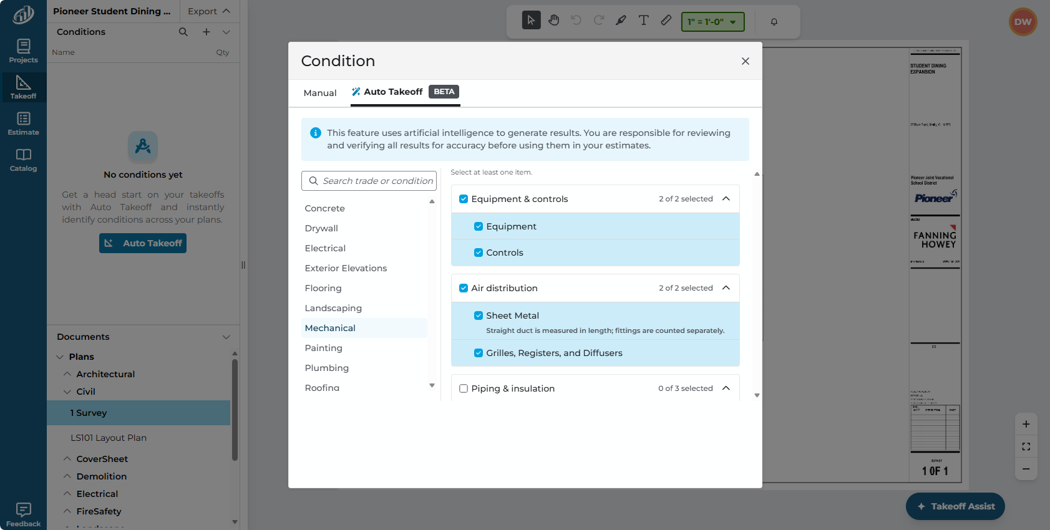
Auto Takeoff for Mechanical offers numerous options. If you don't see what you need, enter it in the text box at the bottom of the list.
Auto Takeoff sends your request to Takeoff Assist which scans your entire plans set, figures out which plans need takeoff, which provide supporting information for the takeoff, and then goes to work.
The payoff for estimators
Takeoff Assist can do a lot of the repetitive work for you in referencing plans and details and specs in just a few minutes and then drawing a very comprehensive takeoff for you. You can spend less time drawing takeoff and more time doing real estimating work.
Takeoff Assist delivers Conditions and takeoff that help you get a real head start on your project, while explaining omissions or conflicts within the plans.
Let's be realistic though, AI can't take all the work out of takeoff and estimating; you, the estimator, are a vital part of that workflow! A more organized first pass creates a clearer path to the questions that affect your estimate.
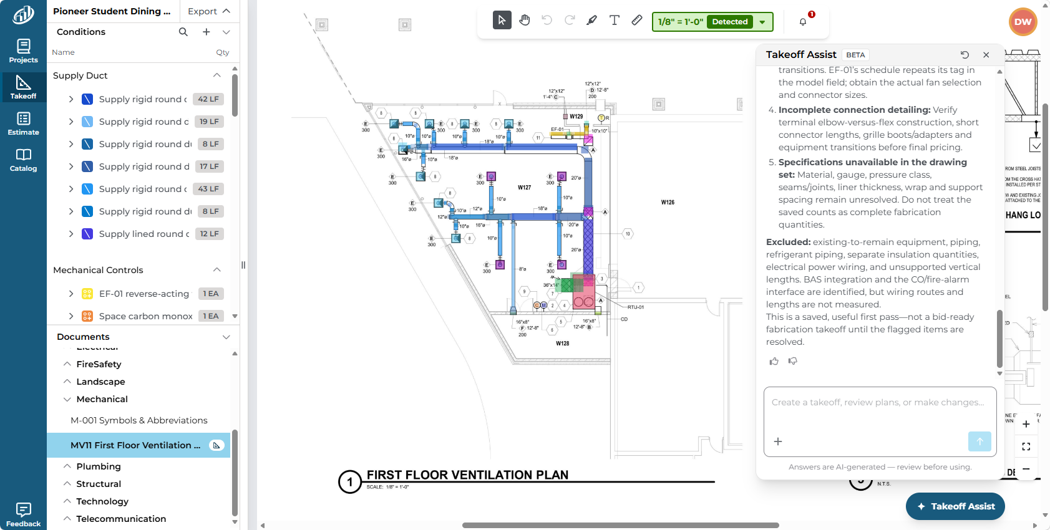
A completed Auto Takeoff for Mechanical - connect the visual result to review-ready pricing preparation.
Mechanical takeoff usually means spending hours poring over plans and details - lots of clicks, endless switching between plans, details, specs, and other repetitive, tedious tasks. With Auto Takeoff, you can spend your time on more valuable tasks like ensuring your estimate is up-to-date and accurate, that you are bidding the right projects, and that you are investing in your industry relationships to help you grow your business.
Keep the estimator in control
Mechanical estimating still depends on the complete drawing set. Equipment types and capacities may tie to schedules. Duct and pipe sizes, materials, and routing may change between plans, sections, and details. Grilles, registers, and diffusers may have different requirements by location. Insulation, controls, and refrigerant piping may depend on system-specific notes and specifications.
Review the generated conditions and quantities, then adjust, reassign, or add measurements where needed. Confirm scope boundaries and coordination requirements before using the results to price the work.
If you aren't satisfied with the results, tell Takeoff Assist more details about what you want. Use natural language to communicate with it, just like you would any other assistant.
|
Important
Takeoff BOOST's Auto Takeoff and Takeoff Assist deliver an AI-assisted starting point. Always verify scale, scope, Conditions, quantities, and specifications before using results in an estimate.
|